
When I began this project, I realized that the best way for me to learn about the inner workings of Active Directory Certificate services was to set up a variety of lab environments so that I can get an overview of various configurations. This is particular to my learning style, as I have found in the past that if I stick to one setup I tend to miss the “forest for the trees” (no pun intended) and forget that a different setup yields another set of challenges and features. While I know I cannot replicate every possibility, I would like some variety in the environments where I set up and test ADCS usage and security.
This lead me to think of creating the following scenarios:
- Intentionally Vulnerable Lab
- All in one Certificate Authority Lab
- Distributed Services lab
- SIEM to monitor activity in all labs
Intentionally Vulnerable Lab : Game of Active Directory
For the intentionally vulnerable lab I chose to use the Windows penetration testing playground developed by Orange CyberDefense called Game of Active Directory as detailed in a previous post. The GOAD lab is available in a variety of sizes, I chose the full lab as it creates a structure of 2 forests, 3 domains across 5 virtual machines. This is a setup that I would have difficulty configuring in my own environment, and will be the focus of much of the security research done in this project.
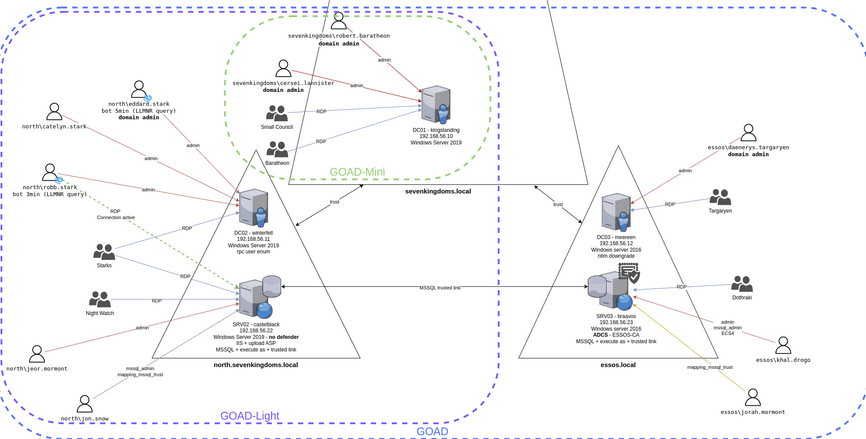
All-in-one ADCS lab
This will be the simple version of an ADCS deployment. In this scenario, the Certificate Authority and supplemental services such as Web Enrollment and Certificate Responders will all be installed on one machine. While I understand this is an incredibly vulnerable configuration, it will serve as the basis for other configurations as I learn more about ADCS. As this project continues, I intend to replace this portion of the lab with a standalone root certificate authority which will remain offline, supplemented by an intermediate certificate authority. The initial installation will include everything on the Domain Controller, which is extremely bad practice but will allow me to test ADCS components with the simplest configuration possible.
Distributed Services ADCS lab
This lab too will likely be developed over time. I will begin by creating the Domain and hosting the ADCS services on a Domain-joined machine to serve as the Certification Authority. The intention with this lab is to install the components piece by piece and experiment with adding features such as the online responder and web enrollment to other machines than the Domain Controller.
SIEM

To get the most out of this project, I will install a Security Information Events Monitoring (SIEM) solution to ingest logs from all machines. The tool I have chosen to use is called Wazuh, which is open-source, relatively lightweight, and easy to configure. More information on Wazuh can be found in their excellent official documentation. The intention here is to create detection and response rules that can apply to both all ADCS configurations in my lab AND the particular configurations I create, to get a better understanding of how a SIEM solution can be customized for a particular use case.
Adding to the domains
Just as the GOAD lab has domain services such as MSSQL, IIS etc preconfigured on it, I will be adding machines to the domains I create to test how AD certificates can be utilized for these services. While I don’t have a set number of domain machines in mind currently, I want to leave room for experimentation so I can configure the domains in a way that I think would be useful in a production environment. This will include a variety of servers and workstations.
Back to reality
The reality is I have access to limited computing resources. I found that the environments that I want to create will require me to be creative with how I use the devices at my disposal to host these resources. As the lab will be virtualized, this gives me several options. While, my particular configuration will not be typical or necessarily optimal I hope that detailing my setup can serve as a guide to how someone can make the best out of what they have. I chose to have this setup running with the multiple labs concurrently, because I like the idea of having lots of toys to play with at one time but the individual labs could be built and destroyed as needed to be contained on one device OR if one had access to a server with sufficient capacity be build on one device. The possibilities are endless, but in the following posts I will detail how I got my labs to work with the equipment I currently have.
 Hackers With a heart