
In the last post, we saw that we could identify the CA names as well as the web enrollment endpoints using Nmap and Openssl. Exploitation of ADCS certificates largely focuses around tactics of privilege escalation and persistence, therefore I created a non-privileged user for each domain, “John Doe”. With this user we can get a clearer picture of ADCS configuration and available template. Also, vulnerabilities in the web enrollment features can also be explored with this account.
First, we can get an overview of how ADCS is used in a domain by simply using LDAP queries. These are usually allowed for all users as they present the structure of the directory, so that users, computers and services can request access to objects in Active Directory. For this I used ldapsearch, a popular linux based tool for probing LDAP. The command below queries all objects under the “Public Key Services” container in Active Directory.
ldapsearch -x -LLL -H ldap://10.3.0.10 -D “cn=John Doe,cn=Users,dc=sevenkingdoms,dc=local” -w ‘Password123!’ -b “cn=Public Key Services,cn=Services,cn=configuration,dc=sevenkingdoms,dc=local” “(ObjectClass=*)”
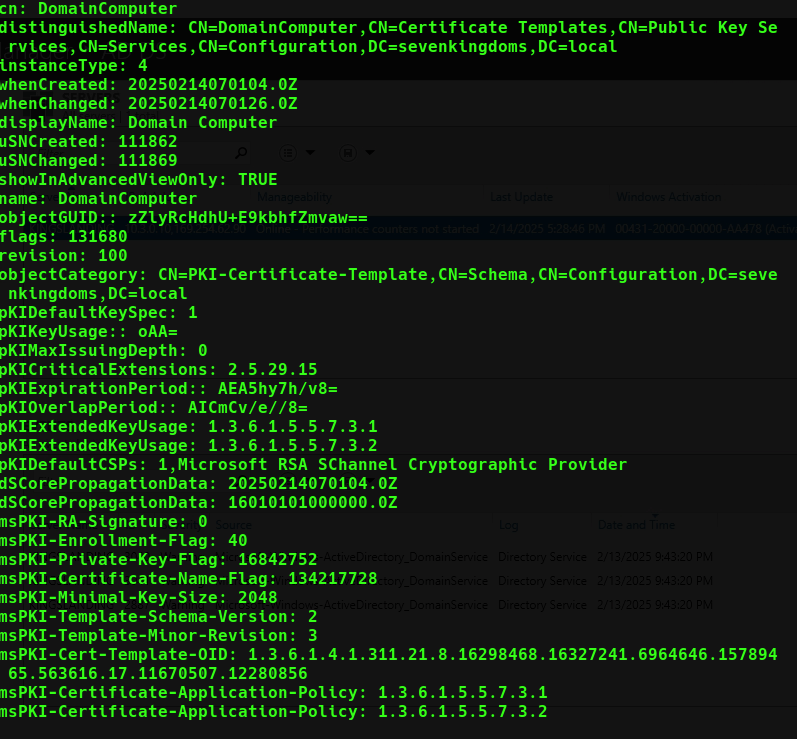
This gives us detailed but difficult to decipher information about each Certification Authority, PKI objects, and certificate templates. It would be beneficial to get a view of which certificates are enabled as well as the distiguished names of all Certification Authorites. For instance, we can customize a ldap query to get a list of all certificate templates that are set to publish to Active Directory and have auto-enrollment enabled:
ldapsearch -x -LLL -H ldap://10.3.0.10 -D "cn=John Doe,cn=Users,dc=sevenkingdoms,dc=local" -w 'Password123!' -b "cn=Certificate templates,cn=public key services,cn=services,cn=configuration,dc=sevenkingdoms,dc=local" "(&(|(objectClass=pKICertificateTemplate))(msPKI-Enrollment-Flag:=40))"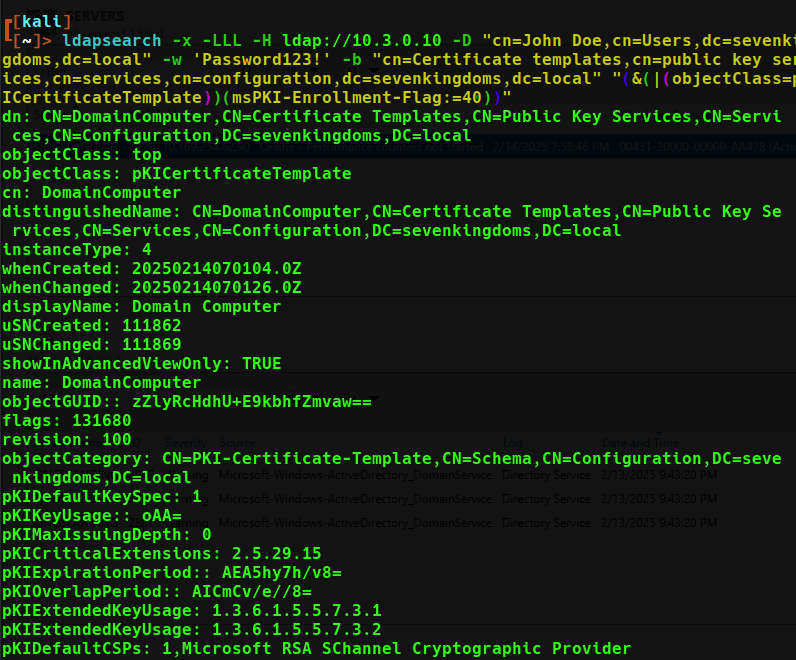
Or query for the name of the CA:
ldapsearch -x -LLL -H ldap://10.3.0.10 -D "cn=John Doe,cn=Users,dc=sevenkingdoms,dc=local" -w 'Password123!' -b "cn=public key services,cn=services,cn=configuration,dc=sevenkingdoms,dc=local" "(ObjectClass=certificationAuthority)"
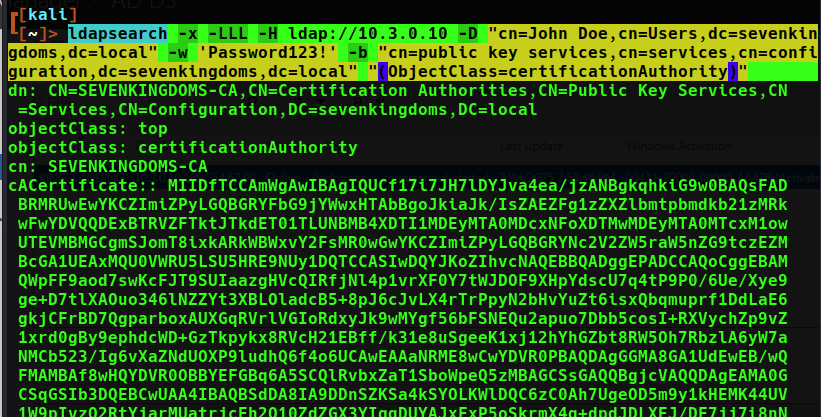
The results of running these commands across the 3 domains:
| domain | Certificate Authority | Enabled Templates |
| sevenkingdoms.local | Sevenkingdoms-CA | DomainComputer |
| north.sevenkingdoms.local | none in domain | no such object |
| essos.local | essos-CA | ESC1,2,3,4…etc demos for exploits |
Luckily there are other tools we can use than ldap to query certificates in a domain. First we can use the native “certutil” command, this command will give CA info on a host we suspect contains the CA.
certutil -CAInfo 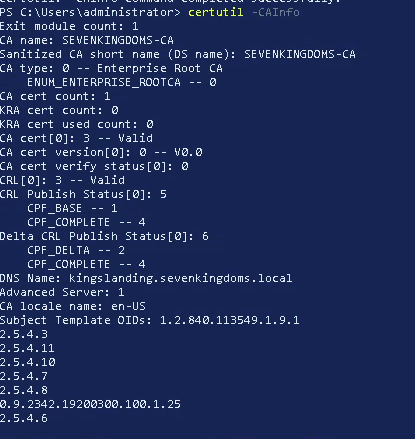
There are many switches to certutil that will display and edit certificate templates, requests, and even add certificates to the computer/user store.
To enumerate certificate templates with certutil, get the “config” or name of the CA and run a command like this to see the templates.
certutil -CATemplates -config CA01.certlab.local\certlab-CA01-CA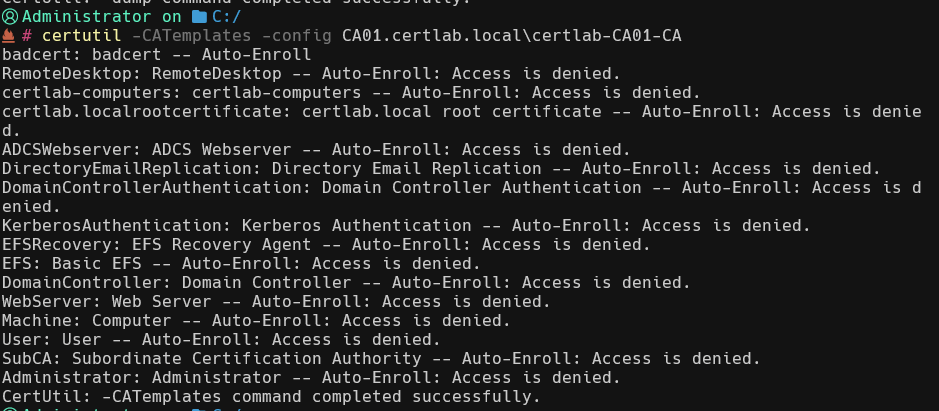
For our purposes of enumerating templates a great tool for this is called Certipy/Certify. Certify is a windows executable while Certipy is written in python and designed to run from a remote Linux host. Certify is flagged by Windows Defender, therefore we will use Certipy remotely.
certipy-ad find -output jdoes_essos_certipy -u jdoe@essos.local -p 'Password123!' -dc-ip 10.3.0.12 -target-ip 10.3.0.12 -vulnerable
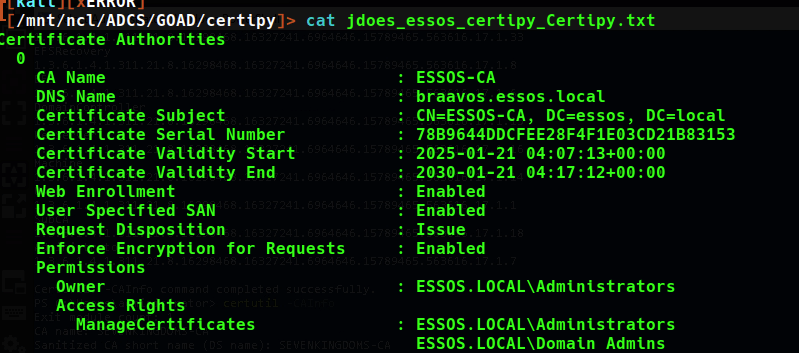
This command gives us everything we need, including the dns name of the Certificate authority which in the case of essos.local, is on the braavos.essos.local machine.
Certipy even gives us a listing of known vulnerable templates that map to the vulnerabilities outlined in Certified Preowned. This will come in handy in the next sections as we exploit these templates as well as secure the templates we create in our various lab domain.
Takeaways
Certificate Authority, template, and web enrollment information is available for all users to query through ldap and therefore other tools such as certutil and Certipy can help us understand the landscape with use of an authenticated user account. While the output from tools such as ldapsearch are extensive, using Certipy and Certify give us a much more useful look at the security components of ADCS. Also as we will see these tools can help with testing exploits on the vulnerable templates and the web enrollment service itself.
 Hackers With a heart